NoBige-JackCh3n

copy to my blog

作用

​ 把在A托管平台的仓库完全的迁移到B托管平台,保留commit历史记录。

解决

​ 如何将 Github 上的仓库导入腾讯开发者平台[保留commit历史记录]

​ 如何将 coding上的仓库导入Github[保留commit历史记录]

​ 如何将 coding上的仓库导入gitee[保留commit历史记录]

​ 如何将 gitee上的仓库导入Github[保留commit历史记录]

​ …..

步骤

  1. 新建
  2. 克隆
  3. 提交
  4. 推送

以Coding(腾讯开发者平台)迁移到Github 为例

Git 操作

1.新建项目

在GitHub中新建一个同名项目(不同命也可以),不选择 启用 README.md 文件初始化项目,以及任何 License 和 .gitignore 文件。

​ 不选择 启用 README.md 文件初始化项目,以及任何 License和 .gitignore文件。

​ 不选择 启用 README.md 文件初始化项目,以及任何 License和 .gitignore文件。

​ 不选择 启用 README.md 文件初始化项目,以及任何 License和 .gitignore文件。

2.克隆 腾讯开发者平台 上的项目

将 腾讯开发者平台 上想要导入的项目完整克隆到本地。

本地执行

1
git clone https://git.dev.tencent.com/abc/xyz.git --bare

3.将克隆下来的仓库推送到开发者平台

克隆完成后,将仓库推送到 开发者平台上。
使用仓库页面提供的 URL。推送所有的分支和对象

1
2
cd xyz.git
git push https://github.com/abc/xyz.git --all

4.完成后,再执行推送所有的标签。

1
git push https://github.com/abc/xyz.git --tags

这样,整个仓库就全部导入到 开发者平台中了。

TortoiseGit 操作

1.克隆 腾讯开发者平台 上的项目

2.进入项目文件夹,右键->TortoiseGit 同步

TortoiseGit同步

点击管理

TortoiseGit同步

填写GitHub的信息,并添加,应用,确认。

TortoiseGit设置

远端URl选中刚刚添加的GitHub 提交

TortoiseGit推送

完后再提交标签

TortoiseGit推送标签

参考

如何将Git仓库导入腾讯云开发者平台?

效果

​ 保护域名权重(虽然权重都是0)

使用

1.复制

复制代码,按需要修改 域名和http 或是https

1
2
3
4
5
6
7
8
9
10
11
12
13
14
15
16
17
18
19
20
21
22
23
24
25
26
27
28
29
30
31
32
33
34
35
36
37
38
39
40
41
42
43
44
45
46
47
48
49
50
51
52
53
54
55
56
57
58
59
60
61
62
63
64
65
66
67
68
<html>
<head>
<meta http-equiv="Content-Type" content="text/html; charset=UTF-8">
<meta name="robots" content="noindex, nofollow" />
<script>
//base64加密解密函数
var base64EncodeChars="ABCDEFGHIJKLMNOPQRSTUVWXYZabcdefghijklmnopqrstuvwxyz0123456789+/";var base64DecodeChars=new Array(-1,-1,-1,-1,-1,-1,-1,-1,-1,-1,-1,-1,-1,-1,-1,-1,-1,-1,-1,-1,-1,-1,-1,-1,-1,-1,-1,-1,-1,-1,-1,-1,-1,-1,-1,-1,-1,-1,-1,-1,-1,-1,-1,62,-1,-1,-1,63,52,53,54,55,56,57,58,59,60,61,-1,-1,-1,-1,-1,-1,-1,0,1,2,3,4,5,6,7,8,9,10,11,12,13,14,15,16,17,18,19,20,21,22,23,24,25,-1,-1,-1,-1,-1,-1,26,27,28,29,30,31,32,33,34,35,36,37,38,39,40,41,42,43,44,45,46,47,48,49,50,51,-1,-1,-1,-1,-1);function base64encode(str){var out,i,len;var c1,c2,c3;len=str.length;i=0;out="";while(i<len){c1=str.charCodeAt(i++)&255;if(i==len){out+=base64EncodeChars.charAt(c1>>2);out+=base64EncodeChars.charAt((c1&3)<<4);out+="==";break}c2=str.charCodeAt(i++);if(i==len){out+=base64EncodeChars.charAt(c1>>2);out+=base64EncodeChars.charAt(((c1&3)<<4)|((c2&240)>>4));out+=base64EncodeChars.charAt((c2&15)<<2);out+="=";break}c3=str.charCodeAt(i++);out+=base64EncodeChars.charAt(c1>>2);out+=base64EncodeChars.charAt(((c1&3)<<4)|((c2&240)>>4));out+=base64EncodeChars.charAt(((c2&15)<<2)|((c3&192)>>6));out+=base64EncodeChars.charAt(c3&63)}return out}function base64decode(str){var c1,c2,c3,c4;var i,len,out;len=str.length;i=0;out="";while(i<len){do{c1=base64DecodeChars[str.charCodeAt(i++)&255]}while(i<len&&c1==-1);if(c1==-1){break}do{c2=base64DecodeChars[str.charCodeAt(i++)&255]}while(i<len&&c2==-1);if(c2==-1){break}out+=String.fromCharCode((c1<<2)|((c2&48)>>4));do{c3=str.charCodeAt(i++)&255;if(c3==61){return out}c3=base64DecodeChars[c3]}while(i<len&&c3==-1);if(c3==-1){break}out+=String.fromCharCode(((c2&15)<<4)|((c3&60)>>2));do{c4=str.charCodeAt(i++)&255;if(c4==61){return out}c4=base64DecodeChars[c4]}while(i<len&&c4==-1);if(c4==-1){break}out+=String.fromCharCode(((c3&3)<<6)|c4)}return out}function utf16to8(str){var out,i,len,c;out="";len=str.length;for(i=0;i<len;i++){c=str.charCodeAt(i);if((c>=1)&&(c<=127)){out+=str.charAt(i)}else{if(c>2047){out+=String.fromCharCode(224|((c>>12)&15));out+=String.fromCharCode(128|((c>>6)&63));out+=String.fromCharCode(128|((c>>0)&63))}else{out+=String.fromCharCode(192|((c>>6)&31));out+=String.fromCharCode(128|((c>>0)&63))}}}return out}function utf8to16(str){var out,i,len,c;var char2,char3;out="";len=str.length;i=0;while(i<len){c=str.charCodeAt(i++);switch(c>>4){case 0:case 1:case 2:case 3:case 4:case 5:case 6:case 7:out+=str.charAt(i-1);break;case 12:case 13:char2=str.charCodeAt(i++);out+=String.fromCharCode(((c&31)<<6)|(char2&63));break;case 14:char2=str.charCodeAt(i++);char3=str.charCodeAt(i++);out+=String.fromCharCode(((c&15)<<12)|((char2&63)<<6)|((char3&63)<<0));break}}return out}function doit(){var f=document.f;f.output.value=base64encode(utf16to8(f.source.value));f.decode.value=utf8to16(base64decode(f.output.value))};

//获取请求参数,支持伪静态
function GetQueryString(name)
{
var reg = new RegExp("(^|&)"+ name +"=(.*)$");
var r = window.location.search.substr(1).match(reg);
if(r!=null) {
return unescape(r[2]);
} else {
return window.location.pathname.replace('/go/',''); //注意代码中的/goto/和跳转地址/goto/保持一致,请记得自行修改!
}
}
var jump_url = GetQueryString("u");

//若传入的是base加密数据,则进行解密处理
if( jump_url == base64encode(base64decode(jump_url))) {
jump_url = base64decode(jump_url);
}

//url简单正则
var UrlReg = "^((http|https|thunder|qqdl|ed2k|Flashget|qbrowser|ftp|rtsp|mms)://)";

//自定义一些跳转字符串,请根据实际需求自行发挥
// if(jump_url=="baidu") {
// var jump_url="https://www.baidu.com/";
// }

//网址校验
if(jump_url == null || jump_url.toString().length<1 || !jump_url.match(UrlReg)) {
document.title = '参数错误,正在返回首页...';
jump_url = location.origin;
}

//延时执行跳转
setTimeout(
function link_jump()
{
//非本站域名不允许使用此跳转页面,请自行修改域名
var MyHOST = new RegExp("nobige.cn");
if (!MyHOST.test(document.referrer)) {
location.href = "https://" + MyHOST;
return;
}
location.href = jump_url;
}, 1000);
setTimeout(function(){window.opener=null;window.close();}, 50000);
</script>
<title>页面加载中,请稍候...</title>
<style type="text/css">
body{background:#555}.loading{-webkit-animation:fadein 2s;-moz-animation:fadein 2s;-o-animation:fadein 2s;animation:fadein 2s}@-moz-keyframes fadein{from{opacity:0}to{opacity:1}}@-webkit-keyframes fadein{from{opacity:0}to{opacity:1}}@-o-keyframes fadein{from{opacity:0}to{opacity:1}}@keyframes fadein{from{opacity:0}to{opacity:1}}.spinner-wrapper{position:absolute;top:0;left:0;z-index:300;height:100%;min-width:100%;min-height:100%;background:rgba(255,255,255,0.93)}.spinner-text{position:absolute;top:45%;left:50%;margin-left:-100px;margin-top:2px;color:#000;letter-spacing:1px;font-size:20px;font-family:Arial}.spinner{position:absolute;top:45%;left:50%;display:block;margin-left:-160px;width:1px;height:1px;border:20px solid rgba(255,0,0,1);-webkit-border-radius:50px;-moz-border-radius:50px;border-radius:50px;border-left-color:transparent;border-right-color:transparent;-webkit-animation:spin 1.5s infinite;-moz-animation:spin 1.5s infinite;animation:spin 1.5s infinite}@-webkit-keyframes spin{0%,100%{-webkit-transform:rotate(0deg) scale(1)}50%{-webkit-transform:rotate(720deg) scale(0.6)}}@-moz-keyframes spin{0%,100%{-moz-transform:rotate(0deg) scale(1)}50%{-moz-transform:rotate(720deg) scale(0.6)}}@-o-keyframes spin{0%,100%{-o-transform:rotate(0deg) scale(1)}50%{-o-transform:rotate(720deg) scale(0.6)}}@keyframes spin{0%,100%{transform:rotate(0deg) scale(1)}50%{transform:rotate(720deg) scale(0.6)}}
</style>
</head>
<body>
<div class="loading">
<div class="spinner-wrapper">
<span class="spinner-text">页面加载中,请稍候...</span>
<span class="spinner"></span>
</div>
</div>
</body>
</html>

2.粘贴

​ 粘贴成 go.html HEXO静态博客存放目录是 根\source\go.html 或是自行建立go文件夹则目录路径是根\source\go\go.html

3.白名单

​ 编辑根目录下的 _config.yml 在skip_render 下添加 go.html 如图

_config.ym skip_render

3.使用

​ 使用方法

/go.html?u=https://www.google.com/?gws_rd=ssl
/go.html?u=aHR0cHM6Ly93d3cuZ29vZ2xlLmNvbS8/Z3dzX3JkPXNzbA==

代码原自《分享最近对网站外链跳转页面代码的一些改善》

问题

pull时,弹窗出现以下内容


Disconnected: No supported authentication methods

available (server sent: publickey)

确定

可能的原因

Git和TortoiseGit有冲突

解决方法

TortoiseGit—Settings–Network–修改SSH client为 git的ssh.exe

例如我的具体地址是:

C:\Program Files\Git\usr\bin\ssh.exe

TortoiseGit Settings

替换后,再次尝试pull,博主改过则是可以正常pull

tortoisegit 常见错误disconnected no supported authentication methods available(server sent: publickey)

由来

​ 网络上一大堆刷机教程,我也是按着他们的方法来进行刷机的,但是找了几个教程都是老的,哟哟几个关键性的问题都没有解决,使刷机过程不能正常的进行,而我写这个则是为了填那些之前人挖的坑。(线刷,其他未试)

刷机

​ 三步走,装驱动,下固件,刷机

驱动和固件官方和论坛都有提供,为此我也在网盘上做了备份。

刷机教程可以按着软件来走,所提供的软甲和驱动都安装完成且可以正常打开。

我这边引用了360论坛@Smile草莓所写的线刷部分正确教程,作为备份。

打开线刷工具

打开线刷工具

校验固件

校验固件

错误的过程

错误的过程

​ 我一直错误第6步,不管是如何的重启还是换电脑,换端口换数据线都是不行,后面再论坛上有要按音量键和开机键 再插入也是没有效果,更有有人说是驱动没有装,要插入电脑的几秒内在设备管理器里面将带有感叹号的驱动给装上,奈何手速不如人家,多个USB口都没有实现。不过这位小老弟的思路是对的,确实是驱动没有完全的安装完。

​ 我后面再在找到了360F4完美强刷教程,说是不用退出云账号等云云都是可以的,抱着死马当活马医的心态我还是试了一下。结果还是可以的。在第六步校验完后用MTK软件进行强刷。

下载

在装完强刷驱动和软件后

​ 在校验完后电脑的C盘下,具体目录如下:

64位

C:\Program Files (x86)\QiKU Download Assistant\DownFiles

32位

C:\Program Files \QiKU Download Assistant\DownFiles

DownFiles 这个就是强刷的固件包文件夹,值得一提的是这个文件夹是隐藏的。

在用flash_tool工具进行刷机(修改成中文options[option]->General[Language]->English改成简体中文)

下载DA选的是flash_tool工具文件夹下面的*MTK_AllInOne_DA.bin*

配置文件则是校验包里面复制出来的\1501_M02\MT6753_Android_scatter.txt文件

校验没的选,下载不便(说是改成“全部格式化和下载”有可能需要拆机拆电池🔋才可以连上电脑)

配置图

配置图

操作完以上,关机插上电脑,就可以点击下载了。

​ 软件和单片机刷写固件差不多,等到进度条走完,弹出绿色的弹窗就可以关掉软件,断开数据线开机了。第一次开机时间比较久。

​ 我第一次刷为体验最新版的(2018-03-20 16:46 V1.0.09稳定版)看了下没有什么特色还是5.1的就想刷A版035 版说是可以用联通4G,我刷完了也没有什么效果。还好只是备用机接收短信的。

​ 只要强刷一次后后续就可以用官方的软件进行正常的升级和降级了(强刷装驱动???)

总结

​ 360F4 可以算是酷派和360分手前的最后一步产品,酷派和360都不是什么好货,大部分国产手机都有一个类似的毛病,就是后期的软件升级还是售后太差(价格摆在那),不管是我之前用的台电还是360都是如此,sony z3v(美版)都是没有系统升级,到了后面完全抛弃了,这点还是得像某果和某哥再不行某米学习,买此类产品还是得看后期的服务支持。

​ 善用搜索引擎(百度)

参考和部分官网链接

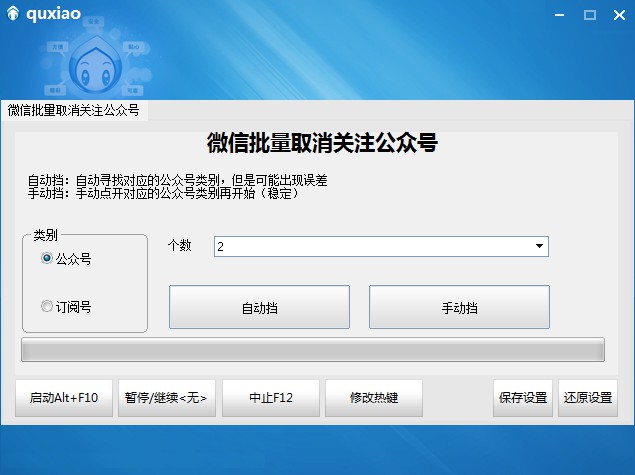
软件界面

由来

​ 可能是真的太闲了,在整理微信小号的时候发现之前几个在挂机赚钱的几个号,不管是微信订阅号还是公众号都关注了一大堆有的没的,消息不停,看着都难受,便是突发其想将其订阅号批量取关,搜索了下没有类似的软件,也害怕(期中一个号还因为登录环境问题今天刚辅助验证了)于是便动手录个脚本,可以运行但其效率不高,又看着是vb语言便生写脚本的冲动。

​ 时间太久了Vb的语法基本都忘光了,用的是按键精灵(老版破解),语法提示不是很清楚(真的忘得差不多了),且其语法应该是修改过的,与Vb大有不同。

​ 这个脚本软件做的过程还是挺有趣的,一开始是纯录制接着是指定x,y坐标,最后才是句柄的相对坐标和位置,还通过颜色来实现(图片错误率高),一点点升级

使用

软件分自动挡和手动挡,推荐手动挡

  1. 自动挡则是登录微信pc版,开启软件,选中对应的公众号类别就可以了

  2. 手动挡则是登录微信pc版,手动点开对应的公众号类别,开启软件,再选中对应的公众号类别就可以了

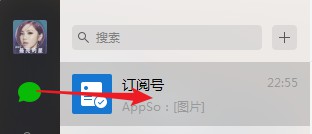
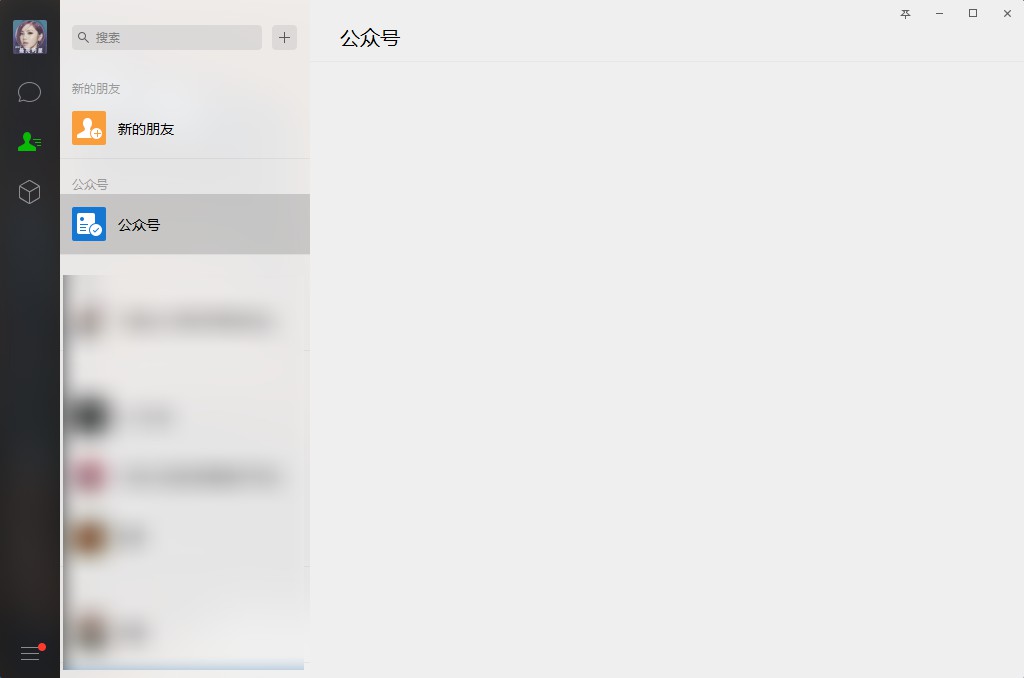
手动挡使用

手动点开公众号或是订阅号

手动挡使用

停止

双击exit.bat 批处理结束

BUG

  1. 自动挡,即自动寻找公众号和订阅号可能出现找不准确的情况,颜色干扰
  2. 不能停止???不知道怎么写热键停止,尝试了下无果便用批处理来直接结束进程

下载

quxiao.zip (2.57 MB)包含源码

效果

使用前

使用前

使用后

使用后

源码

1
2
3
4
5
6
7
8
9
10
11
12
13
14
15
16
17
18
19
20
21
22
23
24
25
26
27
28
29
30
31
32
33
34
35
36
37
38
39
40
41
42
43
44
45
46
47
48
49
50
51
52
53
54
55
56
57
58
59
60
61
62
63
64
65
66
67
68
69
70
71
72
73
74
75
76
77
78
79
80
81
82
83
84
85
86
87

Function quxiao(n, z)
Form1.ProgressBar1.Value =0
For n
i=i+1
Form1.ProgressBar1.Value = 100 * i / n //进度条
Delay 500
Call Plugin.Bkgnd.RightClick(WeChat, 415, 100)//第一个公众号的位置
Delay 500
CMenuWnd = Plugin.Window.Find("CMenuWnd", "CMenuWnd")
Call Plugin.Bkgnd.LeftClick(CMenuWnd, 25, z)
Delay 500
ConfirmDialog = Plugin.Window.Find("ConfirmDialog", "微信")
Call Plugin.Bkgnd.LeftClick(ConfirmDialog, 222, 188)
Delay 500
Next
End Function
Event Form1.Button1.Click
Dim index,n,z,p,s
index = Split(Form1.ComboBox1.List, "|")
n = index(Form1.ComboBox1.ListIndex)
MessageBox ("即将取消关注" + n + "个公众号")
WeChat = Plugin.Window.Find("WeChatMainWndForPC", "微信")
Delay 500
Call Plugin.Window.Max(WeChat)
Delay 500
Plugin.Window.Show(WeChat)
Delay 500
Call Plugin.Window.Max(WeChat)
Delay 500
If Form1.OptionBox1.Value = 1 Then //公众号
z = 65
s="公众号"
Call Plugin.Bkgnd.LeftClick(WeChat, 25, 140)//通讯录
Else
z = 45
s="订阅号"
Call Plugin.Bkgnd.LeftClick(WeChat, 25, 90)//聊天
End If
XY = Plugin.Bkgnd.FindColor(WeChat, 0, 0, 1024, 310, "D6852F")
ZB = InStr(XY, "|")
X = Clng(Left(XY, ZB - 1)): Y = Clng(Right(XY, Len(XY) - ZB))
Delay 500
Call Plugin.Bkgnd.LeftClick(WeChat, X, Y)
Call Plugin.Bkgnd.MoveTo(WeChat, X, Y)
Delay 500
Plugin.Window.Restore (WeChat)
Delay 500
Call Plugin.Window.Size(WeChat, 1024, 678)
p=quxiao(n,z)
MessageBox(n + "个"+s+"已经取消关注了")
End Event
Event Form1.Button2.Click
Dim index,n,z,p,s
index = Split(Form1.ComboBox1.List, "|")
n = index(Form1.ComboBox1.ListIndex)
MessageBox ("即将取消关注" + n + "个公众号")
WeChat = Plugin.Window.Find("WeChatMainWndForPC", "微信")
Delay 500
Call Plugin.Window.Max(WeChat)
Delay 500
Plugin.Window.Show(WeChat)
Delay 500
Call Plugin.Window.Max(WeChat)
Delay 500
If Form1.OptionBox1.Value = 1 Then //公众号
z = 65
s="公众号"
Call Plugin.Bkgnd.LeftClick(WeChat, 25, 140)//通讯录
Else
z = 45
s="订阅号"
Call Plugin.Bkgnd.LeftClick(WeChat, 25, 90)//聊天
End If

Delay 500
Call Plugin.Bkgnd.LeftClick(WeChat, X, Y)
Call Plugin.Bkgnd.MoveTo(WeChat, X, Y)
Delay 500
Plugin.Window.Restore (WeChat)
Delay 500
Call Plugin.Window.Size(WeChat, 1024, 678)
p=quxiao(n,z)
MessageBox(n + "个"+s+"已经取消关注了")
End Event


0%