NoBige-JackCh3n

copy to my blog

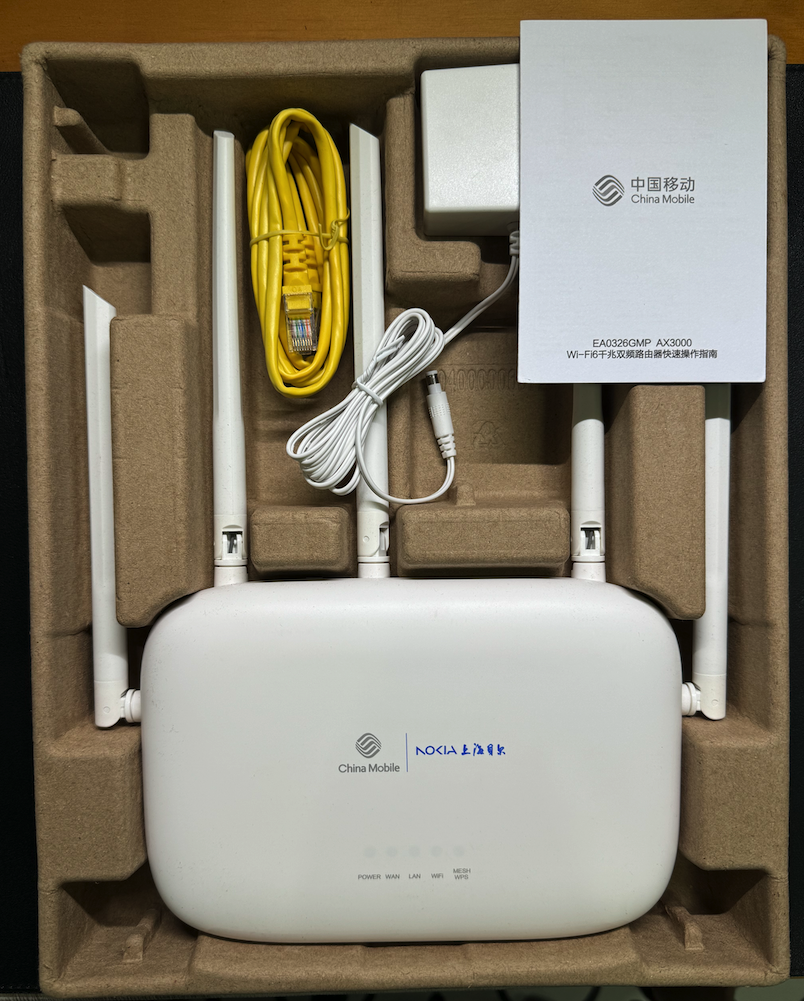
nokia.png

刷入官方OpenWrt

诺基亚/贝尔 EA0326GMP(MT7981B)刷了 OpenWrt 官网的 U-Boot/FIP 引导,刷完引导后通常还需要再刷入完整固件才算完成,接着往下看:

🔧 刷完引导后的标准流程

① 进入 U-Boot TFTP 恢复模式
• 电脑有线网卡设静态 IP:192.168.1.254,网关填 192.168.1.1

• 用 Tftpd64 建 TFTP 服务器(Server Interfaces 选刚才的网卡),把官网下载的 openwrt-mediatek-filogic-nokia_ea0326gmp-initramfs-recovery.itb 放根目录

• 路由器断电 → 按住 Reset 键(有的批次是 Mesh 键)→ 插电 → 约 5~10 秒后松开,U-Boot 会自动 TFTP 拉取 initramfs 启动

拉取日志,一开始是找不到openwrt-mediatek-filogic-nokia_ea0326gmp-initramfs-recovery.itb文件,因为我本地文件名对不上,然后修改后就成功拉取了。

1
2
3
4
5
6
7
File <openwrt-mediatek-filogic-nokia_ea0326gmp-initramfs-recovery.itb> : error 2 in system call CreateFile 系统找不到指定的文件。 [23/05 18:15:57.762]
Connection received from 192.168.1.1 on port 2504 [23/05 18:15:58.809]
Read request for file <openwrt-mediatek-filogic-nokia_ea0326gmp-initramfs-recovery.itb>. Mode octet [23/05 18:15:58.809]
OACK: <timeout=5,blksize=1468,> [23/05 18:15:58.809]
Using local port 61312 [23/05 18:15:58.809]
<openwrt-mediatek-filogic-nokia_ea0326gmp-initramfs-recovery.itb>: sent 6206 blks, 9109504 bytes in 1 s. 0 blk resent [23/05 18:15:59.997]

② 进 initramfs 临时系统刷正式固件
• 启动后 LAN 灯亮,浏览器/SSH 访问 192.168.1.1(root 无密码)

• 浏览器在系统页面直接上传更新或者 SCP 上传 openwrt-*-squashfs-sysupgrade.itb 到 /tmp

• SSH 执行:

sysupgrade -n /tmp/openwrt-*-squashfs-sysupgrade.itb

• 重启后就是完整 OpenWrt,Luci 默认地址 192.168.1.1

⚠️ 常见问题

• TFTP 没反应:关电脑防火墙,确认网卡 IP 严格是 192.168.1.254,TFTP 目录文件名别带空格。

• 按 Reset 进不去 U-Boot:部分批次要按 Mesh/WPS 键而不是 Reset,看电源灯快闪后松开。

• 提示 mtd 只读无法写 FIP:需在原厂 SSH 下先 insmod mtd-rw.ko i_want_a_brick=1 获取写权限,但你已经刷完引导这步可跳过。

如果你是说刷完引导后无法启动/变砖,或想问怎么回退原厂,告诉我现在具体卡在哪一步我帮你排查!

刷成第三方U-Boot

EA0326GMP(MT7981)的 U-Boot 其实是打包在 FIP 分区(BL31+U-Boot 合集)里的,所谓”换 U-Boot”就是刷入对应机型的其他 FIP 镜像(比如 hanwckf 的 bl-mt798x 版、ImmortalWrt ubootmod 版等)。步骤如下:

🔍 第一步:确认 FIP 分区名

SSH 进路由器执行:
cat /proc/mtd

EA0326GMP 通常看到 mtd3: 00200000 "fip",记住这个名字(一般是 fip,大小写要一致)。

💾 第二步:备份原 FIP(强烈建议)

dd if=/dev/mtd3 of=/tmp/fip_backup.bin

用 SCP 把 /tmp/fip_backup.bin 拷回电脑保存

✍️ 第三步:解锁并写入新 FIP

把下载好的 EA0326GMP 专用 FIP 镜像(如 mt7981-nokia-ea0326gmp-fip-expand.bin 或 bl31-uboot.fip)SCP 传至 /tmp/,然后:

情况A — 普通 OpenWrt 已解锁可写:

mtd write /tmp/mt7981-nokia-ea0326gmp-fip-expand.bin fip

fip 换成你 cat /proc/mtd 里看到的实际名字

情况B — 提示 Device or resource busy / Read-only:

1
2
3
4
5
6
7
8
opkg update
opkg install kmod-mtd-rw
insmod mtd-rw i_want_a_brick=1
mtd write /tmp/mt7981-nokia-ea0326gmp-fip-expand.bin fip
# 新版本,适用于OpenWrt 25.12以上
apk add kmod-mtd-rw
insmod mtd-rw i_want_a_brick=1
mtd write /tmp/mt7981-nokia-ea0326gmp-fip-expand.bin fip

看到 Writing from … to fip … 无报错即可。

⚠️ 只刷 EA0326GMP 专用 FIP! 刷其他机型(WR30U/RAX3000M 等)的 FIP 必砖,只能用编程器救。

🔄 第四步:进新 U-Boot 界面验证

• 电脑设静态 IP 192.168.1.2/24,网关 192.168.1.1

• 断电 → 按住 Mesh 键(不是 Reset)→ 插电 → 约 5~8 秒灯闪后松开

• 浏览器访问 http://192.168.1.1,能看到 U-Boot Web 刷机界面说明更换成功

之后就可以在这个 U-Boot 下 TFTP 或 Web 刷对应格式的 OpenWrt/ImmortalWrt 固件了。

第三方U-Boot更换U-Boot

  1. 电脑设静态 IP 192.168.1.2/24,网关 192.168.1.1
  2. 断电 → 按住 Mesh 键(不是 Reset)→ 插电 → 约 5~8 秒灯闪后松开
  3. 浏览器访问 http://192.168.1.1/uboot.html 上传新U-Boot即可

文件哈希

1
2
3
4
5
6
7
8
9
10
11
12
13
14
15
16
17
18
19
20
21
22
23
24
25
26
27
28
29
30
31
32
33
34
35
36
37
38
39
40
# 文件名称: EA0326GMP_SSH.tar.gz
# 文件大小: 30.4 KB (31,156 字节)
# 修改时间: 2024年05月17日,21:40:53
MD5: 52d1c274e620f395f322a32d7d327196
SHA1: fae8246aebf245a0197914d6e6615259596502fb
SHA256: d3300717281d076d93820c50d7e6e498b99e276e019f2563fd09d3786fb792d4
CRC32: 78fa0235

# 文件名称: mt7981_nokia_ea0326gmp-fip-fixed-parts.bin
# 文件大小: 717 KB (734,417 字节)
# 修改时间: 2024年05月17日,21:48:38
MD5: 69a9e0a1f5059c302a0bef3cb9099b6f
SHA1: 15d57a078c90db2644403db3f7a6ae51c487b49f
SHA256: 1e7f6104628b9b74cc74866cf82ba21a4e6f9b4baa037abe6a0a900285f38db8
CRC32: 44d011e8

# 文件名称: mt7981_bell_ea0326gmp-fip-fixed-parts-multi-layout-CN.bin
# 文件大小: 694 KB (710,897 字节)
# 修改时间: 2024年04月02日,07:57:08
MD5: 5da4adb701947665bcb925fabc63f79f
SHA1: 6b4a429b95e99906a0bb8ca31ba7e22add2c93e1
SHA256: 0c627218ad960382617734befb9dfad1d9b1d09427fcf437fb12e267121bfc6d
CRC32: d8f04b93

# 文件名称: immortalwrt-mediatek-filogic-nokia_ea0326gmp-squashfs-sysupgrade.bin
# 文件大小: 18.4 MB (19,385,133 字节)
# 修改时间: 2026年05月24日,02:28:52
MD5: d51b2ecf7d35147c16b2b9e77b0ebef1
SHA1: 006f2fb5364cbdced34a2fae1703be4a18cc8832
SHA256: 3c613a23e729c832d2b255d25fed53bf039b6b8ade9993f991f6e99d8d7bb26b
CRC32: 5c444dd8

# 文件名称: nokia_ea0326gmp-sysupgrade.bin
# 文件大小: 14.0 MB (14,695,212 字节)
# 修改时间: 2025年05月14日,04:57:43
MD5: 6246b0eabe3f23f06420a4ef3736d878
SHA1: 29967832734ae428505474ba65963b83be39d785
SHA256: eac68b78116c8d33d33e046875f72fde15d9a2977d53013e74ac9974bcf0286b
CRC32: 5000071c

所有文件下载地址

1、stackoverflow

单方法,能用,可以再优化

1
2
3
4
5
6
7
async function md5(s) {
const msgUint8 = new TextEncoder().encode(s) // encode as (utf-8) Uint8Array
const hashBuffer = await crypto.subtle.digest('MD5', msgUint8) // hash the message
const hashArray = Array.from(new Uint8Array(hashBuffer)) // convert buffer to byte array
const hashHex = hashArray.map(b => b.toString(16).padStart(2, '0')).join('') // convert bytes to hex string
return hashHex
}

2、github

npm install cf-workers-hash

支持

  • SHA-1
  • SHA-256
  • SHA-384
  • SHA-512
  • MD5
  • BASE64 / BASE64-DECODE
  • XXHASH32
  • XXHASH64
  • BCRYPT / BCRYPT-COMPARE
  • WHIRLPOOL / WHIRLPOOL-DECODE
  • SHA3-224
  • SHA3-256
  • SHA3-384
  • SHA3-512
  • KECCAK224
  • KECCAK256
  • KECCAK384
  • KECCAK512
  • MD6
  • CRC32
  • CRC32C

使用

1
2
3
import { sha1, sha256, sha384, sha512, base64, base64Decode, md5, xxhash64, xxhash32, bcrypt, bcryptCompare, whirlpool, whirlpoolDecode, sha3_512, sha3_224, sha3_256, sha3_384, keccak512, keccak384, keccak256, keccak224, md6, crc32, crc32c } from 'cf-workers-hash';
await sha1('test');
await md5('test');

代码参考

1
2
3
4
5
6
7
8
9
10
11
12
13
14
15
16
17
18
19
20
21
22
23
24
25
26
27
28
29
30
31
32
33
34
35
36
37
38
39
40
41
42
43
44
45
46
47
48
49
50
51
52
53
54
55
56
57
58
59
60
61
62
63
64
65
66
67
68
69
70
71
72
73
74
75
76
77
78
79
80
81
82
83
84
85
86
87
88
89
90
91
92
93
94
95
96
97
98
/* @typescript-eslint/no-unused-functions */

import * as bcryptjs from 'bcryptjs';
import * as xxh from 'xxhashjs';
import * as whirlpooljs from 'whirlpool-hash';
import * as sha3 from 'js-sha3';
import md6Hash from 'md6-hash';
import { Crc32 } from '@aws-crypto/crc32';
import { Crc32c } from '@aws-crypto/crc32c';

function cryptoHasher(hashType: string) {
return async (input: string): Promise<string> => {
const encoder = new TextEncoder();
const data = encoder.encode(input);
const hashBuffer = await crypto.subtle.digest(hashType, data);
const hashArray = Array.from(new Uint8Array(hashBuffer));
return hashArray.map((b) => b.toString(16).padStart(2, '0')).join('');
};
}

export function base64(input: string): Promise<string> {
return Promise.resolve(btoa(input));
}

export function base64Decode(input: string): Promise<string> {
return Promise.resolve(atob(input));
}

export const sha1 = cryptoHasher('SHA-1');
export const sha256 = cryptoHasher('SHA-256');
export const sha384 = cryptoHasher('SHA-384');
export const sha512 = cryptoHasher('SHA-512');
export const md5 = cryptoHasher('MD5');

export async function bcrypt(input: string, saltRounds: number): Promise<string> {
const salt = await bcryptjs.genSalt(saltRounds);
return await bcryptjs.hash(input, salt);
}

function xxhasher(input: string, hashType: string): Promise<string> {
const seed = 0xabcd;
switch (hashType) {
case 'xxhash32':
return Promise.resolve(xxh.h32(input, seed).toString(16));
case 'xxhash64':
return Promise.resolve(xxh.h64(input, seed).toString(16));
default:
return Promise.reject('Invalid hash type');
}
}

export function xxhash32(input: string): Promise<string> {
return xxhasher(input, 'xxhash32');
}

export function xxhash64(input: string): Promise<string> {
return xxhasher(input, 'xxhash64');
}

export async function bcryptCompare(input: string, hash: string): Promise<boolean> {
return bcryptjs.compare(input, hash);
}

export async function whirlpool(input: string): Promise<string> {
const hasher = new whirlpooljs.Whirlpool();
const hash = hasher.getHash(input)
return base64(whirlpooljs.encoders.toHex(hash.toString()).toUpperCase());
}

export async function whirlpoolDecode(input: string): Promise<string> {
const hasher = new whirlpooljs.Whirlpool();
return whirlpooljs.encoders.fromBase64(input);
}

export async function md6(input: string, size: number = 256, key: string = "", levels: number = 64): Promise<string> {
return md6Hash(input,size, key, levels)
}

export async function crc32(input: string): Promise<number> {
const encoder = new TextEncoder();
const data = encoder.encode(input);
return Promise.resolve((new Crc32()).update(data).digest());
}

export async function crc32c(input: string): Promise<number> {
const encoder = new TextEncoder();
const data = encoder.encode(input);
return Promise.resolve((new Crc32c()).update(data).digest());
}

export const sha3_512 = (input: string): Promise<string> => Promise.resolve(sha3.sha3_512(input));
export const sha3_224 = (input: string): Promise<string> => Promise.resolve(sha3.sha3_224(input));
export const sha3_256 = (input: string): Promise<string> => Promise.resolve(sha3.sha3_256(input));
export const sha3_384 = (input: string): Promise<string> => Promise.resolve(sha3.sha3_384(input));
export const keccak512 = (input: string): Promise<string> => Promise.resolve(sha3.keccak512(input));
export const keccak384 = (input: string): Promise<string> => Promise.resolve(sha3.keccak384(input));
export const keccak256 = (input: string): Promise<string> => Promise.resolve(sha3.keccak256(input));
export const keccak224 = (input: string): Promise<string> => Promise.resolve(sha3.keccak224(input));

3、js-md5

直接粘贴进去就能用

https://www.npmjs.com/package/js-md5

1
2
3
4
5
6
7
8
9
10
1/**
2 * [js-md5]{@link https://github.com/emn178/js-md5}
3 *
4 * @namespace md5
5 * @version 0.8.0
6 * @author Chen, Yi-Cyuan [emn178@gmail.com]
7 * @copyright Chen, Yi-Cyuan 2014-2023
8 * @license MIT
9 */
10!function(){"use strict";function t(t){if(t)b[0]=b[16]=b[1]=b[2]=b[3]=b[4]=b[5]=b[6]=b[7]=b[8]=b[9]=b[10]=b[11]=b[12]=b[13]=b[14]=b[15]=0,this.blocks=b,this.buffer8=a;else if(u){var r=new ArrayBuffer(68);this.buffer8=new Uint8Array(r),this.blocks=new Uint32Array(r)}else this.blocks=[0,0,0,0,0,0,0,0,0,0,0,0,0,0,0,0,0];this.h0=this.h1=this.h2=this.h3=this.start=this.bytes=this.hBytes=0,this.finalized=this.hashed=!1,this.first=!0}function r(r,e){var i,s=_(r);if(r=s[0],s[1]){var h,n=[],a=r.length,o=0;for(i=0;i<a;++i)(h=r.charCodeAt(i))<128?n[o++]=h:h<2048?(n[o++]=192|h>>>6,n[o++]=128|63&h):h<55296||h>=57344?(n[o++]=224|h>>>12,n[o++]=128|h>>>6&63,n[o++]=128|63&h):(h=65536+((1023&h)<<10|1023&r.charCodeAt(++i)),n[o++]=240|h>>>18,n[o++]=128|h>>>12&63,n[o++]=128|h>>>6&63,n[o++]=128|63&h);r=n}r.length>64&&(r=new t(!0).update(r).array());var f=[],u=[];for(i=0;i<64;++i){var c=r[i]||0;f[i]=92^c,u[i]=54^c}t.call(this,e),this.update(u),this.oKeyPad=f,this.inner=!0,this.sharedMemory=e}var e="input is invalid type",i="object"==typeof window,s=i?window:{};s.JS_MD5_NO_WINDOW&&(i=!1);var h=!i&&"object"==typeof self,n=!s.JS_MD5_NO_NODE_JS&&"object"==typeof process&&process.versions&&process.versions.node;n?s=global:h&&(s=self);var a,o=!s.JS_MD5_NO_COMMON_JS&&"object"==typeof module&&module.exports,f="function"==typeof define&&define.amd,u=!s.JS_MD5_NO_ARRAY_BUFFER&&"undefined"!=typeof ArrayBuffer,c="0123456789abcdef".split(""),y=[128,32768,8388608,-2147483648],p=[0,8,16,24],d=["hex","array","digest","buffer","arrayBuffer","base64"],l="ABCDEFGHIJKLMNOPQRSTUVWXYZabcdefghijklmnopqrstuvwxyz0123456789+/".split(""),b=[];if(u){var v=new ArrayBuffer(68);a=new Uint8Array(v),b=new Uint32Array(v)}var w=Array.isArray;!s.JS_MD5_NO_NODE_JS&&w||(w=function(t){return"[object Array]"===Object.prototype.toString.call(t)});var A=ArrayBuffer.isView;!u||!s.JS_MD5_NO_ARRAY_BUFFER_IS_VIEW&&A||(A=function(t){return"object"==typeof t&&t.buffer&&t.buffer.constructor===ArrayBuffer});var _=function(t){var r=typeof t;if("string"===r)return[t,!0];if("object"!==r||null===t)throw new Error(e);if(u&&t.constructor===ArrayBuffer)return[new Uint8Array(t),!1];if(!w(t)&&!A(t))throw new Error(e);return[t,!1]},B=function(r){return function(e){return new t(!0).update(e)[r]()}},g=function(t){var r,i=require("crypto"),h=require("buffer").Buffer;r=h.from&&!s.JS_MD5_NO_BUFFER_FROM?h.from:function(t){return new h(t)};return function(s){if("string"==typeof s)return i.createHash("md5").update(s,"utf8").digest("hex");if(null===s||void 0===s)throw new Error(e);return s.constructor===ArrayBuffer&&(s=new Uint8Array(s)),w(s)||A(s)||s.constructor===h?i.createHash("md5").update(r(s)).digest("hex"):t(s)}},m=function(t){return function(e,i){return new r(e,!0).update(i)[t]()}};t.prototype.update=function(t){if(this.finalized)throw new Error("finalize already called");var r=_(t);t=r[0];for(var e,i,s=r[1],h=0,n=t.length,a=this.blocks,o=this.buffer8;h<n;){if(this.hashed&&(this.hashed=!1,a[0]=a[16],a[16]=a[1]=a[2]=a[3]=a[4]=a[5]=a[6]=a[7]=a[8]=a[9]=a[10]=a[11]=a[12]=a[13]=a[14]=a[15]=0),s)if(u)for(i=this.start;h<n&&i<64;++h)(e=t.charCodeAt(h))<128?o[i++]=e:e<2048?(o[i++]=192|e>>>6,o[i++]=128|63&e):e<55296||e>=57344?(o[i++]=224|e>>>12,o[i++]=128|e>>>6&63,o[i++]=128|63&e):(e=65536+((1023&e)<<10|1023&t.charCodeAt(++h)),o[i++]=240|e>>>18,o[i++]=128|e>>>12&63,o[i++]=128|e>>>6&63,o[i++]=128|63&e);else for(i=this.start;h<n&&i<64;++h)(e=t.charCodeAt(h))<128?a[i>>>2]|=e<<p[3&i++]:e<2048?(a[i>>>2]|=(192|e>>>6)<<p[3&i++],a[i>>>2]|=(128|63&e)<<p[3&i++]):e<55296||e>=57344?(a[i>>>2]|=(224|e>>>12)<<p[3&i++],a[i>>>2]|=(128|e>>>6&63)<<p[3&i++],a[i>>>2]|=(128|63&e)<<p[3&i++]):(e=65536+((1023&e)<<10|1023&t.charCodeAt(++h)),a[i>>>2]|=(240|e>>>18)<<p[3&i++],a[i>>>2]|=(128|e>>>12&63)<<p[3&i++],a[i>>>2]|=(128|e>>>6&63)<<p[3&i++],a[i>>>2]|=(128|63&e)<<p[3&i++]);else if(u)for(i=this.start;h<n&&i<64;++h)o[i++]=t[h];else for(i=this.start;h<n&&i<64;++h)a[i>>>2]|=t[h]<<p[3&i++];this.lastByteIndex=i,this.bytes+=i-this.start,i>=64?(this.start=i-64,this.hash(),this.hashed=!0):this.start=i}return this.bytes>4294967295&&(this.hBytes+=this.bytes/4294967296<<0,this.bytes=this.bytes%4294967296),this},t.prototype.finalize=function(){if(!this.finalized){this.finalized=!0;var t=this.blocks,r=this.lastByteIndex;t[r>>>2]|=y[3&r],r>=56&&(this.hashed||this.hash(),t[0]=t[16],t[16]=t[1]=t[2]=t[3]=t[4]=t[5]=t[6]=t[7]=t[8]=t[9]=t[10]=t[11]=t[12]=t[13]=t[14]=t[15]=0),t[14]=this.bytes<<3,t[15]=this.hBytes<<3|this.bytes>>>29,this.hash()}},t.prototype.hash=function(){var t,r,e,i,s,h,n=this.blocks;this.first?r=((r=((t=((t=n[0]-680876937)<<7|t>>>25)-271733879<<0)^(e=((e=(-271733879^(i=((i=(-1732584194^2004318071&t)+n[1]-117830708)<<12|i>>>20)+t<<0)&(-271733879^t))+n[2]-1126478375)<<17|e>>>15)+i<<0)&(i^t))+n[3]-1316259209)<<22|r>>>10)+e<<0:(t=this.h0,r=this.h1,e=this.h2,r=((r+=((t=((t+=((i=this.h3)^r&(e^i))+n[0]-680876936)<<7|t>>>25)+r<<0)^(e=((e+=(r^(i=((i+=(e^t&(r^e))+n[1]-389564586)<<12|i>>>20)+t<<0)&(t^r))+n[2]+606105819)<<17|e>>>15)+i<<0)&(i^t))+n[3]-1044525330)<<22|r>>>10)+e<<0),r=((r+=((t=((t+=(i^r&(e^i))+n[4]-176418897)<<7|t>>>25)+r<<0)^(e=((e+=(r^(i=((i+=(e^t&(r^e))+n[5]+1200080426)<<12|i>>>20)+t<<0)&(t^r))+n[6]-1473231341)<<17|e>>>15)+i<<0)&(i^t))+n[7]-45705983)<<22|r>>>10)+e<<0,r=((r+=((t=((t+=(i^r&(e^i))+n[8]+1770035416)<<7|t>>>25)+r<<0)^(e=((e+=(r^(i=((i+=(e^t&(r^e))+n[9]-1958414417)<<12|i>>>20)+t<<0)&(t^r))+n[10]-42063)<<17|e>>>15)+i<<0)&(i^t))+n[11]-1990404162)<<22|r>>>10)+e<<0,r=((r+=((t=((t+=(i^r&(e^i))+n[12]+1804603682)<<7|t>>>25)+r<<0)^(e=((e+=(r^(i=((i+=(e^t&(r^e))+n[13]-40341101)<<12|i>>>20)+t<<0)&(t^r))+n[14]-1502002290)<<17|e>>>15)+i<<0)&(i^t))+n[15]+1236535329)<<22|r>>>10)+e<<0,r=((r+=((i=((i+=(r^e&((t=((t+=(e^i&(r^e))+n[1]-165796510)<<5|t>>>27)+r<<0)^r))+n[6]-1069501632)<<9|i>>>23)+t<<0)^t&((e=((e+=(t^r&(i^t))+n[11]+643717713)<<14|e>>>18)+i<<0)^i))+n[0]-373897302)<<20|r>>>12)+e<<0,r=((r+=((i=((i+=(r^e&((t=((t+=(e^i&(r^e))+n[5]-701558691)<<5|t>>>27)+r<<0)^r))+n[10]+38016083)<<9|i>>>23)+t<<0)^t&((e=((e+=(t^r&(i^t))+n[15]-660478335)<<14|e>>>18)+i<<0)^i))+n[4]-405537848)<<20|r>>>12)+e<<0,r=((r+=((i=((i+=(r^e&((t=((t+=(e^i&(r^e))+n[9]+568446438)<<5|t>>>27)+r<<0)^r))+n[14]-1019803690)<<9|i>>>23)+t<<0)^t&((e=((e+=(t^r&(i^t))+n[3]-187363961)<<14|e>>>18)+i<<0)^i))+n[8]+1163531501)<<20|r>>>12)+e<<0,r=((r+=((i=((i+=(r^e&((t=((t+=(e^i&(r^e))+n[13]-1444681467)<<5|t>>>27)+r<<0)^r))+n[2]-51403784)<<9|i>>>23)+t<<0)^t&((e=((e+=(t^r&(i^t))+n[7]+1735328473)<<14|e>>>18)+i<<0)^i))+n[12]-1926607734)<<20|r>>>12)+e<<0,r=((r+=((h=(i=((i+=((s=r^e)^(t=((t+=(s^i)+n[5]-378558)<<4|t>>>28)+r<<0))+n[8]-2022574463)<<11|i>>>21)+t<<0)^t)^(e=((e+=(h^r)+n[11]+1839030562)<<16|e>>>16)+i<<0))+n[14]-35309556)<<23|r>>>9)+e<<0,r=((r+=((h=(i=((i+=((s=r^e)^(t=((t+=(s^i)+n[1]-1530992060)<<4|t>>>28)+r<<0))+n[4]+1272893353)<<11|i>>>21)+t<<0)^t)^(e=((e+=(h^r)+n[7]-155497632)<<16|e>>>16)+i<<0))+n[10]-1094730640)<<23|r>>>9)+e<<0,r=((r+=((h=(i=((i+=((s=r^e)^(t=((t+=(s^i)+n[13]+681279174)<<4|t>>>28)+r<<0))+n[0]-358537222)<<11|i>>>21)+t<<0)^t)^(e=((e+=(h^r)+n[3]-722521979)<<16|e>>>16)+i<<0))+n[6]+76029189)<<23|r>>>9)+e<<0,r=((r+=((h=(i=((i+=((s=r^e)^(t=((t+=(s^i)+n[9]-640364487)<<4|t>>>28)+r<<0))+n[12]-421815835)<<11|i>>>21)+t<<0)^t)^(e=((e+=(h^r)+n[15]+530742520)<<16|e>>>16)+i<<0))+n[2]-995338651)<<23|r>>>9)+e<<0,r=((r+=((i=((i+=(r^((t=((t+=(e^(r|~i))+n[0]-198630844)<<6|t>>>26)+r<<0)|~e))+n[7]+1126891415)<<10|i>>>22)+t<<0)^((e=((e+=(t^(i|~r))+n[14]-1416354905)<<15|e>>>17)+i<<0)|~t))+n[5]-57434055)<<21|r>>>11)+e<<0,r=((r+=((i=((i+=(r^((t=((t+=(e^(r|~i))+n[12]+1700485571)<<6|t>>>26)+r<<0)|~e))+n[3]-1894986606)<<10|i>>>22)+t<<0)^((e=((e+=(t^(i|~r))+n[10]-1051523)<<15|e>>>17)+i<<0)|~t))+n[1]-2054922799)<<21|r>>>11)+e<<0,r=((r+=((i=((i+=(r^((t=((t+=(e^(r|~i))+n[8]+1873313359)<<6|t>>>26)+r<<0)|~e))+n[15]-30611744)<<10|i>>>22)+t<<0)^((e=((e+=(t^(i|~r))+n[6]-1560198380)<<15|e>>>17)+i<<0)|~t))+n[13]+1309151649)<<21|r>>>11)+e<<0,r=((r+=((i=((i+=(r^((t=((t+=(e^(r|~i))+n[4]-145523070)<<6|t>>>26)+r<<0)|~e))+n[11]-1120210379)<<10|i>>>22)+t<<0)^((e=((e+=(t^(i|~r))+n[2]+718787259)<<15|e>>>17)+i<<0)|~t))+n[9]-343485551)<<21|r>>>11)+e<<0,this.first?(this.h0=t+1732584193<<0,this.h1=r-271733879<<0,this.h2=e-1732584194<<0,this.h3=i+271733878<<0,this.first=!1):(this.h0=this.h0+t<<0,this.h1=this.h1+r<<0,this.h2=this.h2+e<<0,this.h3=this.h3+i<<0)},t.prototype.hex=function(){this.finalize();var t=this.h0,r=this.h1,e=this.h2,i=this.h3;return c[t>>>4&15]+c[15&t]+c[t>>>12&15]+c[t>>>8&15]+c[t>>>20&15]+c[t>>>16&15]+c[t>>>28&15]+c[t>>>24&15]+c[r>>>4&15]+c[15&r]+c[r>>>12&15]+c[r>>>8&15]+c[r>>>20&15]+c[r>>>16&15]+c[r>>>28&15]+c[r>>>24&15]+c[e>>>4&15]+c[15&e]+c[e>>>12&15]+c[e>>>8&15]+c[e>>>20&15]+c[e>>>16&15]+c[e>>>28&15]+c[e>>>24&15]+c[i>>>4&15]+c[15&i]+c[i>>>12&15]+c[i>>>8&15]+c[i>>>20&15]+c[i>>>16&15]+c[i>>>28&15]+c[i>>>24&15]},t.prototype.toString=t.prototype.hex,t.prototype.digest=function(){this.finalize();var t=this.h0,r=this.h1,e=this.h2,i=this.h3;return[255&t,t>>>8&255,t>>>16&255,t>>>24&255,255&r,r>>>8&255,r>>>16&255,r>>>24&255,255&e,e>>>8&255,e>>>16&255,e>>>24&255,255&i,i>>>8&255,i>>>16&255,i>>>24&255]},t.prototype.array=t.prototype.digest,t.prototype.arrayBuffer=function(){this.finalize();var t=new ArrayBuffer(16),r=new Uint32Array(t);return r[0]=this.h0,r[1]=this.h1,r[2]=this.h2,r[3]=this.h3,t},t.prototype.buffer=t.prototype.arrayBuffer,t.prototype.base64=function(){for(var t,r,e,i="",s=this.array(),h=0;h<15;)t=s[h++],r=s[h++],e=s[h++],i+=l[t>>>2]+l[63&(t<<4|r>>>4)]+l[63&(r<<2|e>>>6)]+l[63&e];return t=s[h],i+=l[t>>>2]+l[t<<4&63]+"=="},(r.prototype=new t).finalize=function(){if(t.prototype.finalize.call(this),this.inner){this.inner=!1;var r=this.array();t.call(this,this.sharedMemory),this.update(this.oKeyPad),this.update(r),t.prototype.finalize.call(this)}};var O=function(){var r=B("hex");n&&(r=g(r)),r.create=function(){return new t},r.update=function(t){return r.create().update(t)};for(var e=0;e<d.length;++e){var i=d[e];r[i]=B(i)}return r}();O.md5=O,O.md5.hmac=function(){var t=m("hex");t.create=function(t){return new r(t)},t.update=function(r,e){return t.create(r).update(e)};for(var e=0;e<d.length;++e){var i=d[e];t[i]=m(i)}return t}(),o?module.exports=O:(s.md5=O,f&&define(function(){return O}))}();

参考

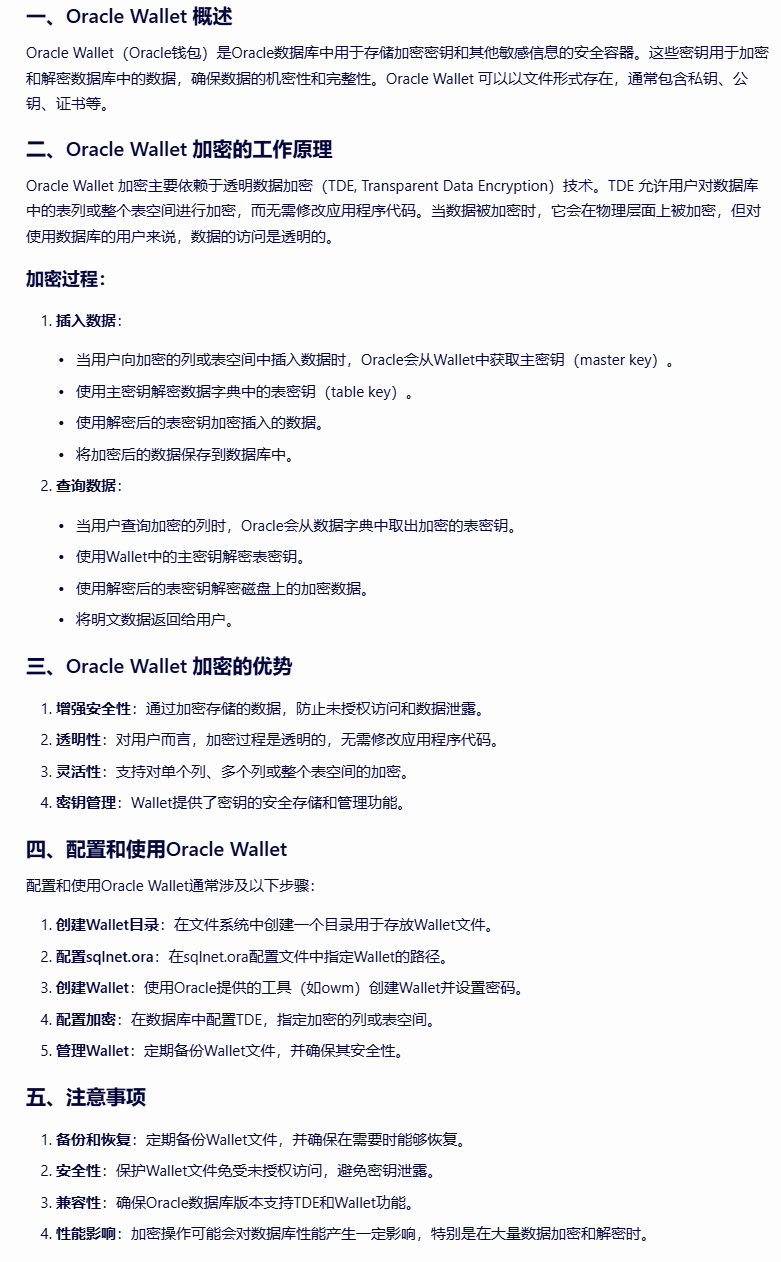
fuckqq_2024-07-12_16-37-09.png

前提

安全等保要求对敏感信息要求加密,公司这边为了应付这个需求不得不搞一些骚操作来应对这个需求,以此有了这个

配置

  • oracle 11g R2
  • 用户名:administrator
  • 安装目录:d:\app

配置和使用Oracle Wallet

配置和使用Oracle Wallet通常涉及以下步骤:

1、创建Wallet目录:在文件系统中创建一个目录用于存放Wallet文件,这个钱包里面保存着密钥,Oracle就是通过这个密钥对列进行加密和解密的。

1
mkdir D:\app\administrator\wallet

2、配置sqlnet.ora:在sqlnet.ora配置文件中指定Wallet的路径。

sqlnet.ora文件在D:\app\administrator\product\11.2.0\dbhome_1\NETWORK\ADMIN下

可以通过监听来查看文件目录

1
lsnrctl status

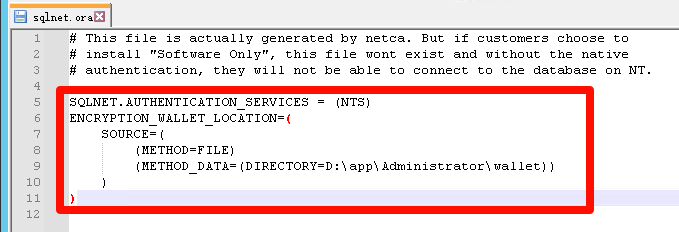
添加配置Wallet的路径

fuckqq_2024-07-12_16-46-39.png

1
2
3
4
5
6
7
8
9
10
11
# This file is actually generated by netca. But if customers choose to 
# install "Software Only", this file wont exist and without the native
# authentication, they will not be able to connect to the database on NT.

SQLNET.AUTHENTICATION_SERVICES = (NTS)
ENCRYPTION_WALLET_LOCATION=(
SOURCE=(
(METHOD=FILE)
(METHOD_DATA=(DIRECTORY=D:\app\Administrator\wallet))
)
)

3、创建Wallet:使用Oracle提供的工具(如owm)创建Wallet并设置密码。

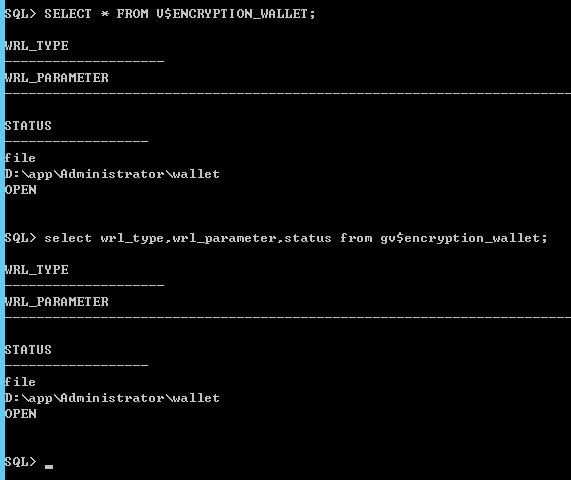
登录sys管理员账号查询是否开启,一般是cloused

1
2
3
4
-- 查询Oracle RAC环境中加密钱包的类型、参数和状态信息。
select wrl_type,wrl_parameter,status from gv$encryption_wallet;
-- 查询当前Oracle数据库实例中加密钱包的所有信息,包括但不限于类型、参数、状态等。
SELECT * FROM V$ENCRYPTION_WALLET;

fuckqq_2024-07-12_16-53-50.png

创建Wallet设置加密相关的密钥为“123456”

1
alter system set encryption key authenticated by "123456";

4、配置加密:在数据库中配置TDE,指定加密的列或表空间。

这边简单说下加密已有的表空间加密(如果加密了整个表空间,那么wallet对表中任何一列加密后,wallet一关闭,这张表就无法查询和程序读取了)

1
2
3
4
5
6
7
8
9
# 已有表中增加新的加密列
ALTER TABLE TEST ADD (salary ENCRYPT);
# 加密已有的表列
ALTER TABLE TEST MODIFY (salary ENCRYPT);
# 举例,加密SXSX表空间里面的PUB_WINDOW表中的ADDRESSEE_PHONE字段
# 注意,要考虑到加密后字段会变长的问题
ALTER TABLE SXSX.PUB_WINDOW MODIFY (ADDRESSEE_PHONE VARCHAR2(255) ENCRYPT);
# 解密已有的表列
ALTER TABLE TEST MODIFY (salary DECRYPT);

5、管理Wallet:定期备份Wallet文件,并确保其安全性。

修改密码

1
orapki wallet change_pwd -wallet D:\app\Administrator\wallet -oldpwd "03F4476516a161B" -newpwd "547c6f36926ce67e"

注意事项

  1. 注意保存和备份Wallet文件!!!
  2. 注意保存和备份Wallet文件!!!
  3. 注意保存和备份Wallet文件!!!

marek-piwnicki-aZxYjgudDdQ-unsplash.jpg

需求

有的时候需要频繁的修改一个文档或者是基于某份模板进行每天的复制然后再进行修改,这种场景一般都是对源文件进行修改然后手动修改文件名再加上时间,脚本就是解决这个需求。本来之前有一个基于易语言写的软件,但是易语言的特性(会报毒)就又找GPT探讨了一下,然后自己再完善最后有了这个bat脚本

用法

  1. 新建一个fileAddDateVersion.bat脚本然后把脚本内容复制粘贴进去,以【管理员】角色运行即可
  2. 对要修改的文件名右键->发送到fCopy或者是fMove区别就是一个是复制、一个是移动

举例

1
2
3
4
5
6
7
8
9
# 文件
工作日报--张得帅.xlsx

# fCopy
工作日报--张得帅.xlsx
工作日报--张得帅V.2024_0712_1110.xlsx

# fMove
工作日报--张得帅V.2024_0712_1110.xlsx

脚本

文件名:fileAddDateVersion.bat

1
2
3
4
5
6
7
8
9
10
11
12
13
14
15
16
17
18
19
20
21
22
23
24
25
26
27
28
29
30
31
32
33
34
35
36
37
38
39
40
41
42
43
44
45
46
47
48
49
50
51
52
53
54
55
56
57
58
59
60
61
62
63
64
65
66
67
68
69
70
71
72
73
74
75
76
77
78
79
80
81
82
83
84
85
86
87
88
89
90
91
92
93
94
95
96
97
98
99
100
101
102
103
104
105
106
107
108
@echo off
setlocal enabledelayedexpansion

rem 获取当前日期
for /f "tokens=1-3 delims=/: " %%a in ('echo %date%') do (
set year=%%a
set month=%%b
set day=%%c
)

rem 获取当前时间
set hour=%time:~0,2%
if "%hour:~0,1%"==" " set hour=0%hour:~1,1%
set minute=%time:~3,2%

rem 年月日时分补零
if "%month:~0,1%"==" " set month=0%month:~1,1%
if "%day:~0,1%"==" " set day=0%day:~1,1%
if "%month:~0,1%"=="0" set month=0%month:~1,1%
if "%day:~0,1%"=="0" set day=0%day:~1,1%

rem 构造时间戳
set timestamp=%year%_%month%%day%_%hour%%minute%
echo %timestamp%
set sendto_path=%APPDATA%\Microsoft\Windows\SendTo
echo %sendto_path%
rem 判断参数个数
if "%~1"=="" (
rem 创建脚本的快捷方式
set bat_dir=%~dp0
set bat_file=%~nx0
echo %sendto_path%
call :createShortcut "fCopy" "c" "%sendto_path%"
ping 127.0.0.1 -n 1 >nul
move "fCopy.lnk" %sendto_path%\"fCopy.lnk"
call :createShortcut "fMove" "m" "%sendto_path%"
ping 127.0.0.1 -n 1 >nul
move "fMove.lnk" %sendto_path%\"fMove.lnk"
explorer shell:sendto
goto :eof
)

if "%~2"=="" (
echo 请输入第二个参数: 文件路径
goto :eof
)

rem 提取参数
set operation=%~1
set sourceFile=%~2

rem 确保文件存在
if not exist "%sourceFile%" (
echo 文件不存在: %sourceFile%
goto :eof
)

rem 获取文件的目录、文件名和扩展名
set fileDir=%~dp2
set fileName=%~n2
set fileExt=%~x2

rem 检查文件名中是否包含 V.,如果有则去除旧的时间戳
for /f "tokens=1 delims=V." %%a in ("%fileName%") do (
set updatedName=%%a
)

rem 添加新的时间戳
set newName=%updatedName%V.%timestamp%%fileExt%
rem 目标文件路径
set targetFile=%fileDir%%newName%

rem 选择操作
if /i "%operation%"=="c" (
copy /y "%sourceFile%" "%targetFile%"
echo 文件已复制到: %targetFile%
) else if /i "%operation%"=="m" (
move /y "%sourceFile%" "%targetFile%"
echo 文件已移动到: %targetFile%
) else (
echo 无效的操作参数,请使用 c 或 m
)

endlocal
goto :eof

:createShortcut
rem 创建快捷方式的子例程
rem 参数:1-快捷方式名称,2-传递的参数,3-目标路径
set shortcutName=%1
set shortcutArgs=%2
set targetPath=%3
set shortcutName2=%1.lnk
set shortcutName2=%shortcutName2:"=%
rem 创建快捷方式.vbs文件
(
echo Set WshShell = CreateObject("WScript.Shell"^)
echo Set oShellLink = WshShell.CreateShortcut("%shortcutName2%"^)
echo oShellLink.TargetPath = "%bat_dir%%bat_file%"
echo oShellLink.Arguments = %shortcutArgs%
echo oShellLink.WorkingDirectory = "%bat_dir%"
echo oShellLink.Save
) > "%temp%\createShortcut_%shortcutName%.vbs"

rem 运行.vbs文件创建快捷方式
cscript //nologo "%temp%\createShortcut_%shortcutName%.vbs"
del "%temp%\createShortcut_%shortcutName%.vbs"
goto :eof
0%